





We have all been there. You buy a shiny new gadget, a doorbell, a camera, a smart lock, only to find out a month later that the "smart" features you paid for are locked behind a paywall.
It is called subscription fatigue. In 2025, it feels like every device in our home wants a monthly rent check. But when it comes to home security, this model is not just annoying; it is often inferior.
There is a quiet revolution happening in home tech. You can now build a security system that is faster, more private, and smarter than the big brand cloud cameras, without paying a single cent after you buy the box. The secret lies in two technologies: a no subscription security camera powered by Onboard AI and local storage.
The Cloud Trap vs. The Local Advantage
To understand why local is better, we have to look at how the "Cloud Model" works.
When a traditional cloud camera sees a person, it records a video clip. It then has to upload that heavy video file to a remote server miles away. That server analyzes the video to see if it is a person or a cat. Finally, it sends a notification back to your phone.
If you stop paying the monthly fee, that expensive camera often becomes a "dumb" brick that can’t distinguish a burglar from a bush.
A local storage security camera flips this script. It keeps everything inside your house. There is no uploading. There is no waiting. And most importantly, there is no monthly bill.
Onboard AI vs. Cloud AI: The Brains of the Operation
The biggest leap in recent tech is the move from Cloud AI to Onboard AI.
Cloud AI is like having a brain that lives in another city. Every time your camera sees something, it has to make a phone call to ask, "What is this?" This introduces lag. A delay of 3-5 seconds might not sound like much, but it is the difference between catching a porch pirate and watching a video of them driving away.
Onboard AI means the brain is inside the camera itself. It uses a powerful NPU (Neural Processing Unit) to analyze the video stream in real time, right on the device.
This is where AI Face detection security camera technology shines.
-
Cloud: Upload > Process > Alert (Slow)
-
Onboard: See > Recognize > Alert (Instant)
With Onboard AI, the alert hits your phone in less than a second. It is instantaneous because the data doesn't have to travel across the internet to be understood.
The Next Level: AI Relay Tracking
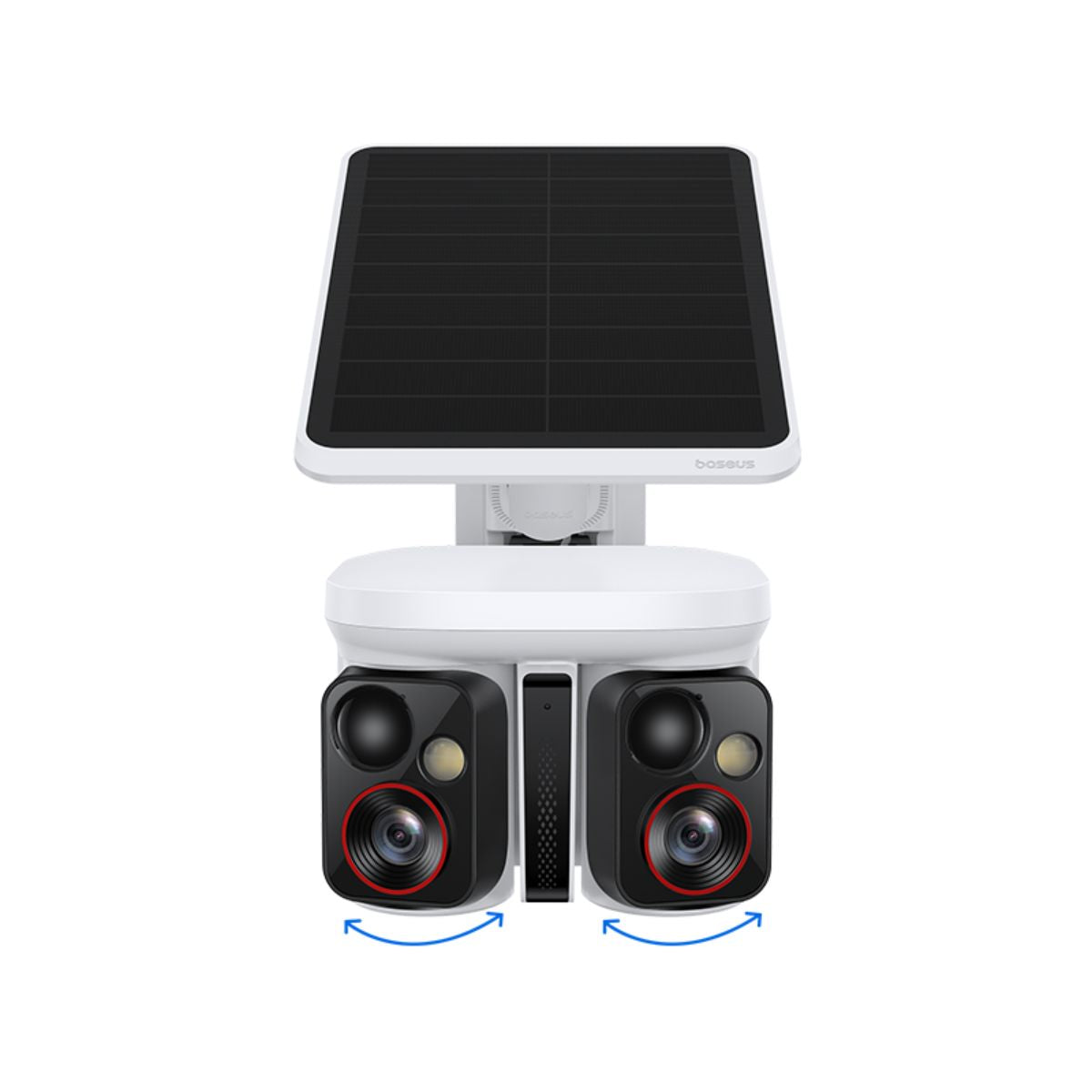
Standard local AI is great, but the Baseus X1 Pro takes it a step further with AI Relay Tracking.
Because the intelligence is local, the system can coordinate complex movements instantly. AI Relay Tracking allows the camera to lock onto a subject and intelligently track them. The system doesn't just see movement; it understands it.
It uses its sophisticated algorithm to identify Humans, Faces, Pets, and Vehicles.
If a car pulls into the driveway, the vehicle detection triggers. If a stranger walks to the door, the face detection activates. This relay of information happens instantly on the device. It ensures that you capture the critical moments clearly, without the lag or confusion of cloud based systems that try to process tracking commands remotely.
The Vault: Why Hub-Based Storage is Safer
So, where does the video go if not to the cloud? This is where the physical setup matters. Most cheap cameras put an SD card inside the camera itself.
The Baseus X1 Pro uses a superior method: Secure Hub-Based Storage.
The camera connects wirelessly to a HomeStation located inside your house. The video is streamed to and stored on this indoor hub.
-
Theft Protection: This is the critical advantage. If a burglar rips the camera off the wall and steals it, they do not get the video. The footage of them stealing the camera is already safely stored inside your home on the HomeStation.
-
Durability: Storing data indoors protects your storage media (like your SD card) from extreme outdoor heat, cold, and moisture, which causes data corruption in standalone cameras.
-
Capacity: Hubs often support much larger storage capacities, allowing you to keep months of footage without paying for cloud servers.
This brings us to security camera privacy. With local hub storage, your footage never leaves your local network. There is no cloud server for a hacker to breach. You own your data, 100%.
Living in a Connected Ecosystem (Alexa & Google)
A common myth is that "local storage means it's not smart." People worry that if they ditch the cloud, they lose their fancy voice commands.
This is false. You can absolutely have a smart home security without subscription.
Modern local cameras are designed to play nice with your smart ecosystem. You can easily find an Alexa compatible outdoor camera that supports local RTSP streams or direct skills.
-
"Alexa, show me the front door." Your local camera instantly streams the live feed to your Echo Show.
-
"Hey Google, show me the backyard." Your Google Home compatible security camera casts the footage to your Nest Hub.
The integration is seamless for live viewing. The only trade-off is that "scrubbing" through your 24/7 timeline usually requires the camera's native app rather than the Google/Amazon app. It is a small price to pay for zero monthly fees and total privacy.
Cost Analysis: The 3-Year Breakdown
Let's look at the math. It is shocking how much "cheap" subscription cameras actually cost.
The Cloud Camera Trap:
-
Upfront Cost: The cost of the camera(e.g. $100)
-
Subscription ($10/mo): $360 over 3 years
-
Total Cost: $460
The Local Storage Hero:
-
Upfront Cost (Better Tech): The cost of the camera (e.g. $160)
-
Subscription: $0
-
Total Cost: $160
In just three years, you save $300. And that savings grows every single month you own the system.
Conclusion
The future of home security is not in the cloud. It is at the "edge"—right there in your home.
By choosing a no subscription security camera, you are choosing speed. You are choosing privacy. You are choosing to own your security rather than rent it. With the power of Onboard AI and the reliability of local storage, you are building a system that is simply smarter.
Stop feeding the subscription beast. It is time to take control of your smart home.
Ready to build a smarter, safer home without the monthly fees? Explore our collection of cutting-edge, subscription-free security cameras.
Pre-Order X1 Pro on Kickstarter
Explore Our Best Selling Security Products
FAQs
What is the difference between Onboard AI and Cloud AI?
Onboard AI vs cloud AI comes down to where the "thinking" happens. Cloud AI sends your video to a remote server to be analyzed, which causes delays and privacy risks. Onboard AI processes the video right inside the camera using a special chip. This results in faster alerts, better privacy, and the ability to detect people even if your internet goes down.
Do local storage cameras work with Alexa and Google Home?
Yes. Most modern local storage cameras can integrate with these systems. You can use voice commands to stream the live video feed to your Echo Show or Google Nest Hub. However, to view recorded history, you will typically need to use the security camera's own app.
What happens to my local storage if the internet goes out?
This is the beauty of local storage. Because the camera does not need to send video to the cloud, it keeps recording and analyzing motion even without an internet connection. Your home remains secure 24/7, regardless of your ISP's status.


